So looking back at last class, there was lot of good work, but many of you didn't put enough work into the concept.
As this is a piece you'll be working on for the rest of the term, this is critical time to really focus on the concept. This is your chance, as an animator, to develop and nurture your own idea.
Anyone can grab a rig, get some dialogue, do a close up of the face and copy reference footage. Copying a good performance isn't easy, any more than doing a drawing from a photograph is. The problem is...you can do the best job possible, and the end result will be, "hey, great job matching that".
But that isn't why you're taking advanced animation, and this is the tricky part of animation...much of the time, you are front loading your big ideas, then spending a LOT of time refining them.
Ultimately, something you put on a reel is a piece of entertainment. If it isn't entertaining people, then it's a missed opportunity.
Also look at the great shorts from Gobelins
Animation Mentor Student Showcase 2016 | 3D Animation Reel from Animation Mentor on Vimeo.
AnimSchool Animation Student Showcase 2016 from AnimSchool on Vimeo.
Friday, October 6, 2017

Friday, September 29, 2017
Friday, September 22, 2017
Module 3
Module 3 (what we're doing today)
As a reminder, you can always look at the tabs above to see the assignments due each week with clarification. If these are not clear, email/contact me!
Due Today
First pass blocking/animation.
One more week on this to finalize it.
Next Week.
Hand in your final animation. You can continue to work on this after the due date for additional credit, but the official due date is next week.
The Pitch.
For the next two weeks, we're pitching our story ideas to the class.
(Look at the pitch tab for detailed instructions)
This is really important, and it may seem weird that we aren't really animating for two weeks, but if this part isn't really solid, the next 10 weeks will be an unmitigated disaster!
I'll attempt to pitch something to you to give you an idea of how (not) to do it.
As a reminder, you can always look at the tabs above to see the assignments due each week with clarification. If these are not clear, email/contact me!
Due Today
First pass blocking/animation.
One more week on this to finalize it.
Next Week.
Hand in your final animation. You can continue to work on this after the due date for additional credit, but the official due date is next week.
The Pitch.
For the next two weeks, we're pitching our story ideas to the class.
(Look at the pitch tab for detailed instructions)
This is really important, and it may seem weird that we aren't really animating for two weeks, but if this part isn't really solid, the next 10 weeks will be an unmitigated disaster!
I'll attempt to pitch something to you to give you an idea of how (not) to do it.
Friday, September 15, 2017

How to time the jaw? Go Henson!
The puppeteers from Henson are clearly the masters at making the most with the least.
The big takeaways are head and jaw movements, and how they are tied to the dialogue. Knowing what to emphasize or minimize really makes these puppets feel real!
Naming Conventions
At the beginning of class, please have your work handed in with the following format
LastnameFirstInitial(or name) + "_" + Module# + _descriptor
For example,
CoopermanJ_M01_lipsynch.mov
CoopermanJ_M01_lipsynch.mov
When exporting animation files, use the following settings.


LastnameFirstInitial(or name) + "_" + Module# + _descriptor
For example,
CoopermanJ_M01_lipsynch.mov
CoopermanJ_M01_lipsynch.mov
When exporting animation files, use the following settings.
When playblasting, set your settings (box after right clicking playblast in the timeline) like this:
Module 2 - Facial Animation
Today's Plan
- Timed posing exercise
- Review rough lip synch animations
- Lecture/demo - the story pitch
- Lecture/demo - blocking/planning around story beats.
So we're on the first assignment - the 3 week lip synch (see the tab to the right)
For this module, we're working a little bit backwards compared to the way an animator usually works, that is, detailing the face and then creating the performance. But why is this bad, one might ask?
It's not all bad, as you can get the feel for the dialogue, but what you miss is how the character reads in the camera.
Today we're going to look at character blocking and how KEY and GOLDEN pose are used to create timing and performance. This is different than blocking for pantomime, as you already have beats and moments locked in.
Today we're going to look at character blocking and how KEY and GOLDEN pose are used to create timing and performance. This is different than blocking for pantomime, as you already have beats and moments locked in.
Friday, September 8, 2017
workflow - Kyle Balda - "Root Out" Method of animating
You can find the rest of these here
Some great workflow tutorials from Kyle Balda, animator and director (Minions) - working very general to specific, essentially moving his character like a puppet, laying in timing, then building poses and detail with each pass.
Some great workflow tutorials from Kyle Balda, animator and director (Minions) - working very general to specific, essentially moving his character like a puppet, laying in timing, then building poses and detail with each pass.
Week 1 - Review - Roughing in the jaw
Just to sum up my workflow in laying in the jaw/rough mouth shapes.
- Listen to the soundclip, write down the sounds.
- Pull the sound into the timeline of maya (make the preferences/sound show the top half of the waveform only and under timeline, make 2x height)
- middle mouse drag through the audio - write down the frame numbers of the shapes a little before they happen. Write notes on the strength of the sound. This is a guideline. Review the 'x-sheet' you've generated to see if there are too many sounds too close together.
- Optional...draw a line over the typed up line of dialogue to show Intensity of volume. Can also write notes like (soft, mushy A sound)
- Using mostly the jaw, time out the audio, referring to your notes, but not being too slavish to them.
- Rough it in, then review it 30F at a time, looking for when the mouth has too many shapes.
- Things that general improve the mouth
- how fast does it open? Too poppy, but hitting at the right time? Start it earlier.
- Is the mouth constantly in motion? If so, hold on some shapes (like Mm)
- does it seem like it's opening and shutting too much? Maybe the sound trails off into a half opened sound, not a hard shut.
workflow - Jason Ryan
Jason Ryan, with heavily 2d influenced workflow
Lipsync Tips and Tricks by iAnimate.net and Jason Ryan from iAnimate on Vimeo.
Lipsync Tips and Tricks by iAnimate.net and Jason Ryan from iAnimate on Vimeo.
workflow - Jeff Gabor
Always a big fan of Jeff Gabor's work, and I appreciate his process reels, as there's a ton to be learned from them.
He very much works in the stepped mode, but not rigidly, and it works because of the incredible amount of planning.
Lots of learning to be had on his Vimeo Site.
Epic Comparison Reel from jeff gabor on Vimeo.
He very much works in the stepped mode, but not rigidly, and it works because of the incredible amount of planning.
Lots of learning to be had on his Vimeo Site.
Epic Comparison Reel from jeff gabor on Vimeo.
Phonmes, Visemes, and other Memes
Workflow post
I'll be going into more detail on facial shapes over the next few weeks.
Here's some reference for viseme based facial animation
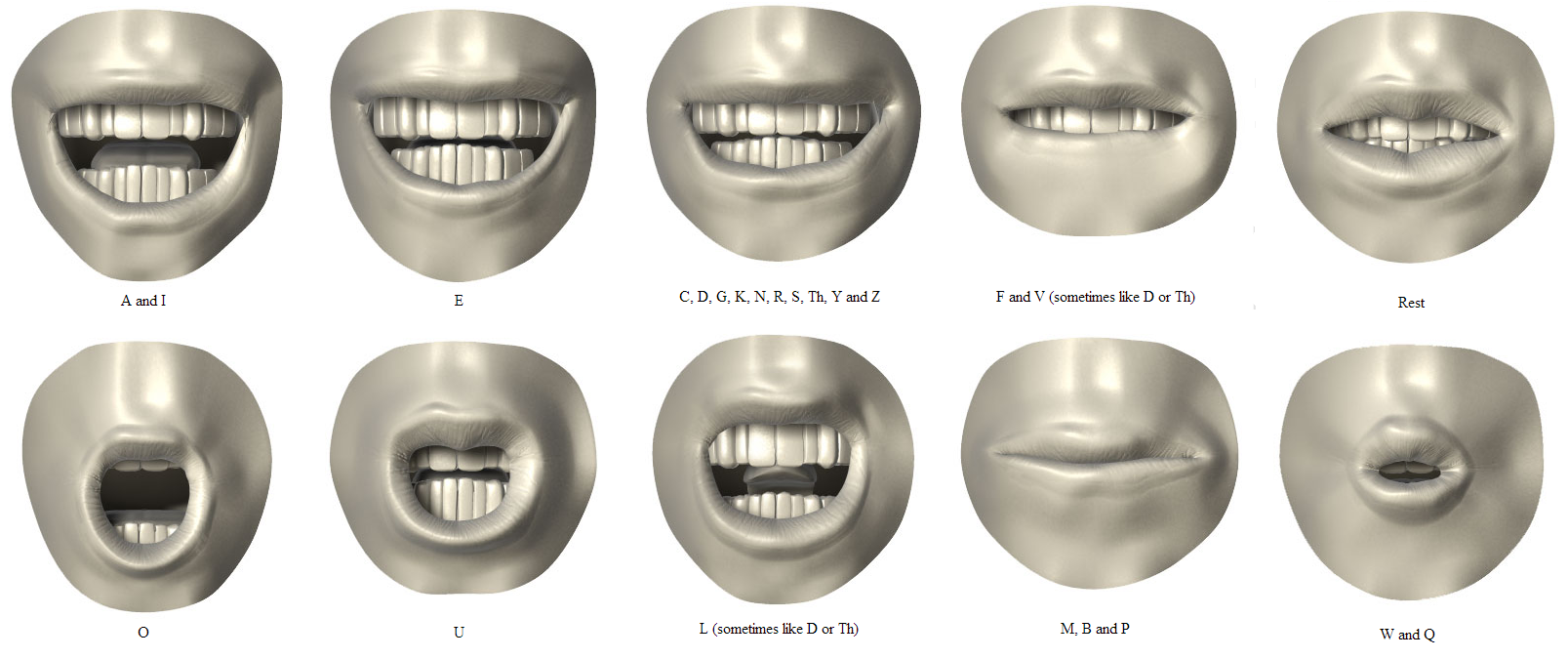
These were brought to everyone's attention with Jason Osipa's book "Stop Staring" - a manual for creating viseme based facial animation, and though it came out some time ago, still well worth the purchase. These are the basic shapes he uses to creat the
It's interesting to see how CG rigs have evolved, and ultimately, how great facial animation comes down to planning and skill, despite the ease of use of rigs. From the old days, when we'd muscle through dozens of overlapping blendshapes, to the advent of GUI based rigs, and now to the on-face controls that make sculpting shapes such a treat, great animation really is in the hands of the person behind the mouse.
The super simple description of visemes is the shape the mouth makes when forming sounds, as contrasted to Phonomes, which are the pose a mouth takes when forming words. (I'll find better definitions for you on this)
I'll be going into more detail on facial shapes over the next few weeks.
Here's some reference for viseme based facial animation
These were brought to everyone's attention with Jason Osipa's book "Stop Staring" - a manual for creating viseme based facial animation, and though it came out some time ago, still well worth the purchase. These are the basic shapes he uses to creat the
It's interesting to see how CG rigs have evolved, and ultimately, how great facial animation comes down to planning and skill, despite the ease of use of rigs. From the old days, when we'd muscle through dozens of overlapping blendshapes, to the advent of GUI based rigs, and now to the on-face controls that make sculpting shapes such a treat, great animation really is in the hands of the person behind the mouse.
The super simple description of visemes is the shape the mouth makes when forming sounds, as contrasted to Phonomes, which are the pose a mouth takes when forming words. (I'll find better definitions for you on this)
Day One - Hello!
Welcome to lip synch and facial animation.
I'm going to rely on this blog pretty heavily as a way of providing content, lecture information, assignments, and also as a way for you to solicit feedback on your work from both myself and other students.
Since it's the first day, it will be a bit less structured than it will going forwards, but it's a good time to get a sense of where everyone is, go over expectations and talk about our goals in this class.
Things we'll go over today:
From the outline:
I'm going to rely on this blog pretty heavily as a way of providing content, lecture information, assignments, and also as a way for you to solicit feedback on your work from both myself and other students.
Since it's the first day, it will be a bit less structured than it will going forwards, but it's a good time to get a sense of where everyone is, go over expectations and talk about our goals in this class.
Things we'll go over today:
- You - your background, any work you'd like to show.
- This blog - you all will be blog authors and can add content.
- timed posing demo - (will go over in a bit)
- tools, some basic tools for maya (I'll be adding a dropbox link)
- Mini lectures
- rough workflow for working with dialogue
- mouth on a layer
- writing down beats
- visemes, phonemes, and other memes
- Character research and acting choices.
- stepped v. spline.
- we'll do a couple of these - you'll have 5 min or each of these to draw or pose an animated sequence of 3 poses showing a change of emotion.
From the outline:
Module 1
Topic: Introductions
Notes: Class introductions, grading policies and assignment parameters. Sign up for the blog.
Lecture/Demo:
Researching your subject.
Subtext: what a character says and what they mean.
Class participation: “Cookie Points”
Skills review and meet Morphy.
Working quickly: Timed posing demo. Show sources for sound
.
Researching your subject.
Subtext: what a character says and what they mean.
Class participation: “Cookie Points”
Skills review and meet Morphy.
Working quickly: Timed posing demo. Show sources for sound
.
Activity: Students try timed posing. Pick 3-5 sec sound clip for assignment one, pick 11-20 sec sound clip for assignment two.
Assignment: Lip Sync One. (LS1)
Modules 1-4. This is a relatively simple assignment, a quick 3-5 sec
lip sync piece with one character. The purpose of the assignment is to
give you a chance to get warmed up with your rig of choice, and to let
me get an assessment of your current skill level. We're actually doing
this backwards from normal animation workflow, attacking the lip sync
first! Featured principles: Posing, Timing, and Staging. 3-5 sec. long
(72-120 fr) Hand in will be due at the start of module 4. Have rough
visemes ready to show next class.
Watch demo video on vimeo.com/dlatour “Rough Lip sync”
Watch demo video on vimeo.com/dlatour “Rough Lip sync”
Subscribe to:
Comments (Atom)